FIG. 01
RECORD DATA
Category
Project Diary
DATE
After we diagnosed that our model could not see distant targets (that story is here), we landed on a single conclusion: the dataset had to be rebuilt from scratch. What we had simply did not contain the situation we would face in the field.
The fix looked simple: find more data, merge it all, retrain. Doing it was nothing like that. This post is the story of the four problems we ran into while turning 16,000 images into one usable dataset.
Problem 0: what was missing from the data we already had?
To understand the data we already had, we first ran a simple but very instructive analysis: we pulled the size distribution of every label box.
Median box size: ~200 pixels
10th percentile: ~99 pixels
In other words, the data contained no small or distant objects. On top of that, the vast majority of the images had been scraped from the web; real drone frames were a minority. We were training the model on large objects shot from the ground and then expecting it to find small objects shot from the air.
That analysis took five minutes and shaped every decision that followed. Do not train on a dataset you have not looked at.
Problem 1: class-name chaos
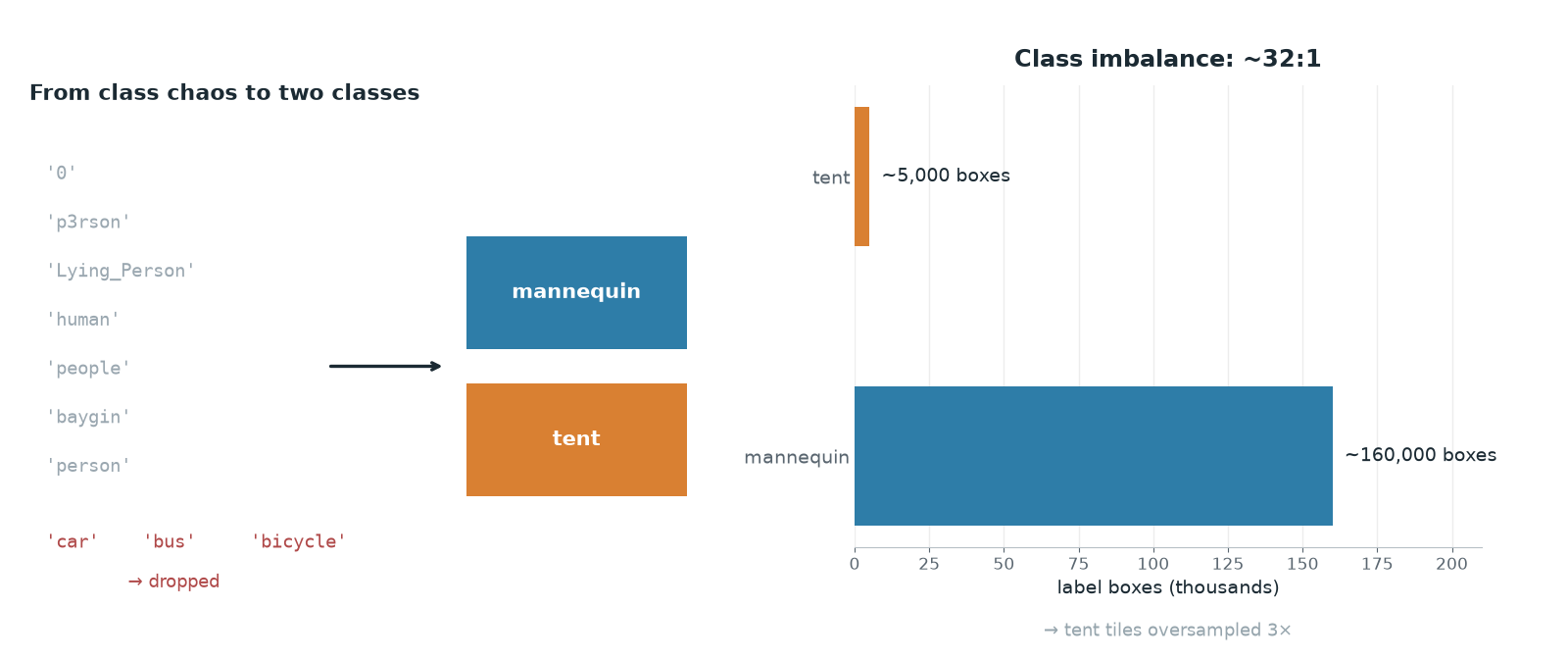
Merging a handful of different sources produced a class list that looked like this:
'0''0 pedestrian''Lying_Person''Person''baygin''bicycle''bus''car''human''motobike''motorbik3''p3rson''people''person''tent'
Fifteen classes. Among them were typos (p3rson, motorbik3), other languages (baygin, Turkish for "unconscious"), several names for the same thing (Person, person, human, people), and classes with nothing to do with our mission (car, bus, bicycle).
Our mission has exactly two targets: mannequin and tent. Here is the mapping we settled on:
Source classes | Target class |
|---|---|
person, people, human, Person, p3rson, Lying_Person, pedestrian, baygin |
|
tent |
|
car, bus, bicycle, motorbike... | dropped |
One class needed real care: the one named plain '0'. The name told us nothing about its contents, but it carried more than 4,000 boxes. Throwing it out blindly and keeping it blindly were equally risky. So we opened a few of its images with the boxes drawn on and looked: they were people shot from the air. Exactly the data we needed. Into the mapping it went.
Lesson: settle an ambiguous class with your eyes, not with a guess. Looking at five images either saves 4,000 boxes or saves you from mislabeling them.
Problem 2: invisible duplicates
Data coming from different projects contained copies of each other, and in two distinct forms:
a) Augmented copies. Platforms like Roboflow can generate rotated and brightness-shifted variants of every image on export. The filenames differ, but the content is a variation of the same image.
b) The same image under a different name. One source image sitting in two projects under two different filenames.
Leave these in and two things happen. The dataset bloats, since you teach the same information over and over. Worse still, if one copy of an image ends up in training and the other in validation, you get data leakage: the model answers a question it has already seen, and the metrics rise for the wrong reason.
We cleaned in two passes:
aHash shrinks the image to 8×8 and encodes each pixel as 1 or 0 depending on whether it sits above or below the mean. It is robust to resizing and to JPEG compression, which is exactly what catches the "same image, saved differently" case.
Result: roughly 2,000 duplicates eliminated.
Problem 3: a 32-to-1 imbalance
When the merge was finished, the class distribution looked like this:
mannequin(people): ~160,000 boxestent: ~5,000 boxes
Roughly 32:1. The reason is obvious: aerial people datasets (crowd scenes) are everywhere, while aerial tent data is rare. A single frame can hold dozens of people; a tent usually stands alone.
Training on that imbalance pushes the model to ignore the tent class, because in loss terms the cost of missing a tent is small next to the reward for getting people right.
Our fix was to oversample the minority class: we replicated training frames containing a tent 3×. We wired this into an automatic step that counts the data, works out which class is in the minority, and multiplies it. That way the logic keeps working even when the dataset changes underneath it.
Problem 4: not contaminating the validation set
This was the easiest decision to skip and the most critical one we made.
We had two kinds of images: web-scraped shots (the majority) and real aerial frames from our own drone (the minority). Had we picked the validation set at random, it would have filled up mostly with web images.
The consequence would have been predictable: high metrics, poor field performance. The model gets examined on a domain we never fly in.
So we built the validation set exclusively from real aerial frames: 31 images and 121 labeled objects, drawn from a pool of 631 frames. It is a small set (we say so plainly), but what it represents is right.
An easy metric is not a good metric. If the validation set does not reflect the environment the model will actually work in, the number you get is reassuring but uninformative.
Extra steps: tiling and hard negatives
The final two touches:
Tiled training. We cut large images into 1280×1280 tiles with 40% overlap. This increases the relative size of small objects and, at the same time, produces the same distribution as the slicing approach we use at inference time.
Hard negative frames. We added background frames containing no targets at all (grass, debris, shadow, brush) at 15% of the training set. The point is to teach the model to say "nothing here." These frames bring the false alarm rate down, and in a mission where you hunt for a target among debris, that translates directly into points.
Results
The retrained model reached mAP50 0.950 on a validation set made up only of real aerial frames, and in field testing it detected both targets and executed an autonomous drop.
How much of that improvement came from the new data and how much from augmentation? We cannot separate the two exactly, since we changed both together. If you have the time, changing one variable at a time is what makes the result interpretable.
Takeaways
1. Measure your dataset's distribution, not its count. You can have 16,000 images and still have none of the situation you actually need.
2. Merging = class mapping + dedup + balance. Concatenating folders is the easy part of the job.
3. Content-based dedup is mandatory. Filenames are not enough; the same image arrives under different names and creates leakage.
4. Balance the minority class. At 32:1 the model stops learning the minority altogether.
5. The validation set must represent the environment you will operate in. An easy set produces a lying metric.
6. Resolve ambiguity by looking. If a class name does not tell you what is in it, open a few examples and look at them.