FIG. 01
RECORD DATA
Category
Project Diary
DATE
There's a well-known fix for small-object detection: sliced inference (tiling). Instead of handing the model the whole frame, you cut it into overlapping tiles and run each tile on its own. That way a distant small target appears proportionally large inside the tile, and the model can pick it up.
That is exactly how it worked for us. Then we moved it onto the Jetson and dropped to 1-3 frames per second.
This post is the story of the gap between "a solution that works" and "a solution you can use in the field."
Tiling really did work
Proof first. We took two real aerial frames on which our old model produced no detections at all and ran nothing but sliced inference over them, with no change to the model, the data, or the training.
Frame | Full-frame inference | Sliced inference |
|---|---|---|
Frame 1 | 0 detections | 5 detections (max confidence 0.74) |
Frame 2 | 0 detections | 1 detection |
That result was a turning point for us, because it showed us where the problem wasn't. The model could recognize those objects; it simply couldn't see them. The difference was how many pixels the object arrived at the network as.
(A note: ground truth was never formally labeled on those two frames, so we report this as a recovery signal rather than a "recall measurement." What we care about is the gap.)
That finding kicked off two things: rebuilding the dataset and the scale policy from scratch (that post is here), and pulling sliced inference into the flight software.
Moving it to the Jetson: 1-3 FPS
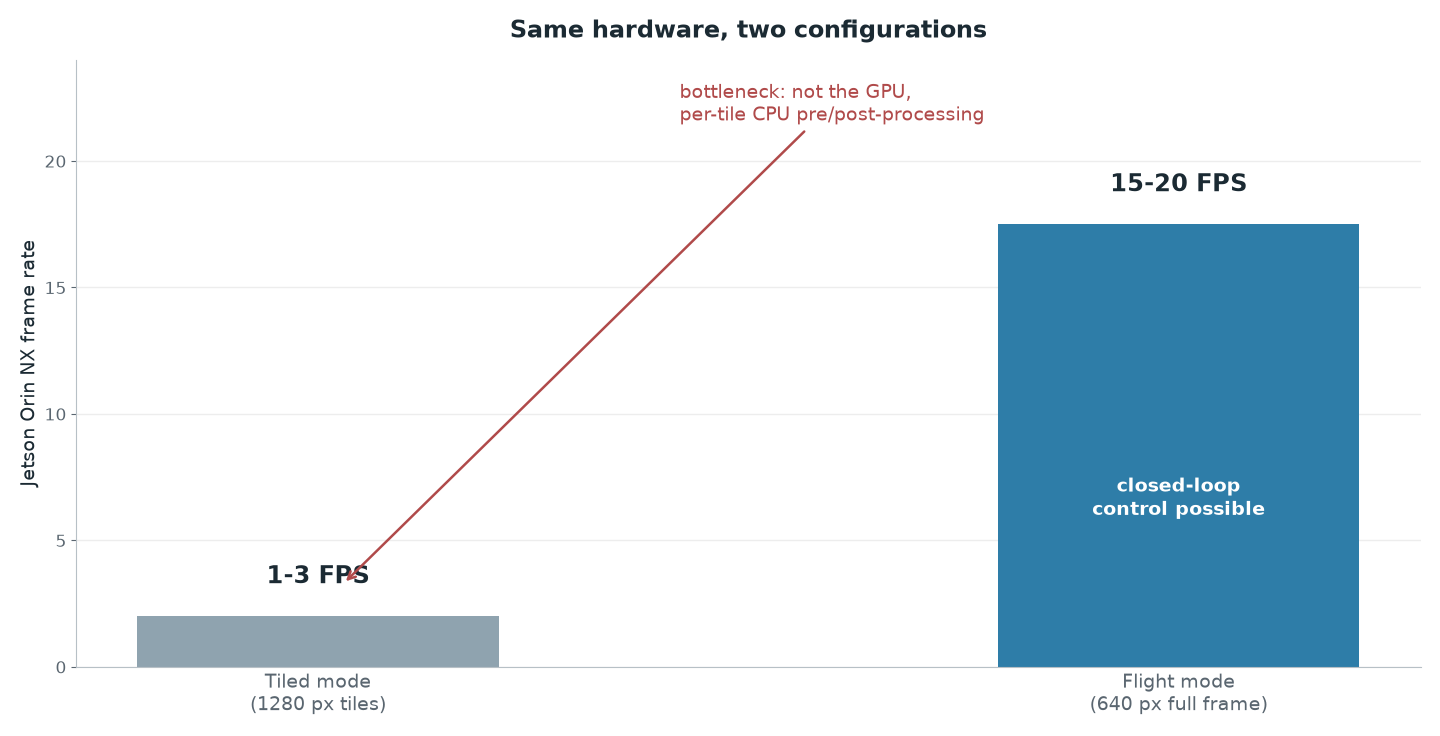
When we ran the sliced pipeline on the Jetson Orin NX, what we measured was 1 to 3 frames per second.
Our first instinct would have been to say "the GPU can't keep up." But once we profiled it, we saw the bottleneck wasn't on the GPU: the time was going into the CPU-side pre- and post-processing done for every tile. Splitting the frame into tiles, getting each tile into the shape the model wants (letterbox, normalization), then mapping each tile's output back into global coordinates and merging them (NMS): all of it gets multiplied by the tile count.
So the problem wasn't "the model is heavy," it was "we were doing the same work N times for every frame".
That distinction matters: if we had diagnosed it as "not enough GPU," we would have gone looking for a smaller model or beefier hardware and headed off in the wrong direction.
The real question: is FPS a requirement or a preference?
This is where we stopped and asked: how many FPS do we actually need?
It's a very easy question to skip. "Real-time" tends to get used as if it unquestionably means 30 FPS. But the requirement comes out of the mission:
In our flow, the aircraft detects the target, records its position, then flies to it and releases the payload while centered on it.
The centering stage is closed-loop control: the aircraft corrects its own position by looking at the image.
In closed-loop control, a low frame rate translates directly into latency. A control loop running at 2 FPS makes decisions on information that is 500 ms stale while the aircraft keeps moving, so it starts oscillating around the target. 2 FPS might have been fine for the search stage; for the centering stage it wasn't.
So the answer: in our scenario, FPS really was a requirement.
The trade: we spent resolution to buy speed
We changed the flight configuration:
Sliced mode | Flight mode | |
|---|---|---|
Inference | 1280 px tiles + full frame | Single full-frame pass, 640 px |
Frame rate (Orin NX) | 1-3 FPS | 15-20 FPS |
Target size at ~20 m (unity zoom) | large within the tile | ~32 px |
Target size at ~46 m (unity zoom) | reasonable within the tile | ~14 px |
Target size at 50 m (3x digital zoom) | — | ~38 px |
Note what bought the speedup: it wasn't a smaller model or more aggressive optimization. It was removing the tiling itself: once the per-tile CPU work went away, the frame rate jumped straight to 15-20.
There is a band in which this trade holds up: at our validated ~20 m working altitude, the mannequin still comes to roughly 32 pixels after the downscale. The scale policy of the model we retrained covers that size.
What the trade honestly cost
The easy way to tell a story like this is to write up what you gained and gloss over the price. Here's the price:
At unity zoom the pixel budget really does collapse with altitude: at 46 meters (the competition's airdrop ceiling) the mannequin falls to roughly 14 pixels at a 640-pixel input, and on the day we ran this measurement we had not yet flown a detection trial in that band.
Two things have closed that gap since. The first is that the number above was incomplete. Detection isn't flown at unity zoom; it's flown with 3x digital zoom, which narrows the field of view to 31.8° and takes the ground sample distance at 50 m from 44.5 mm/px down to 14.8 mm/px. In that configuration the mannequin comes back to roughly 38 pixels at a 640-pixel input, close to the 32 pixels unity zoom gave us at 20 m. The zoom pays back what the altitude takes away.
The second is that the trial got flown. At 49 m AGL with the camera at 3x, the human dummy was detected at 0.60-0.80 confidence, comfortably above our 0.25 operating threshold. The end-to-end autonomous chain was then repeated at 50 m mission altitude, and both payloads landed inside the 50 ft (15.2 m) scoring radius. One item is still open, and it's a narrower one than what we wrote here: the terminal guidance loop hasn't been validated closed-loop on live imagery, because the field drops were commanded from recorded geolocation.
The fallback stays where it was: we keep sliced mode and the compiled TensorRT FP16 engine in the codebase as a disabled option. Sliced inference does recover detections that full-frame misses, but it never met the processing rate autonomous guidance needs, so the single full-frame 640 px pass at a 0.25 threshold is the flight configuration rather than a stopgap.
But "a plan on the shelf" is not "a measured result." We're writing it down as exactly that.
One design decision, changed twice
Looking back, here's the interesting part: the same test changed the design twice.
The sliced inference trial → showed that scale was the cause of the lost detections → the dataset and training policy got rebuilt.
Profiling that same pipeline on the Jetson → exposed the CPU bottleneck → the flight configuration moved to full-frame mode.
A good test doesn't say "pass/fail"; it determines the next decision. In our case tiling turned out to be one of the most valuable experiments in the project even though we don't fly it, because it showed us where the problem was and where it wasn't.
What we took away
1. "It works" and "it works in the field" are different claims. Don't commit a solution to your architecture before you've measured it on the target hardware.
2. Profile before you optimize. Our bottleneck was CPU pre/post-processing, not the GPU; the wrong diagnosis would have led straight to the wrong fix.
3. Question the phrase "real-time." The mission decides how many FPS you need; a search pass and a closed-loop controller don't ask for the same thing.
4. Write down what the trade cost you. Describing your win while hiding your loss misleads your own team as well.
5. Don't delete the solution you rejected. Sliced mode is still sitting in our codebase as a disabled option; if conditions change, it's ready.