FIG. 01
RECORD DATA
Category
Software
DATE
We first noticed it during a field test: the detection box appeared on screen long after the drone had already flown past the target. The model was working and the box was in the right place, but that "right place" was the world as it had been a few seconds earlier. The gap kept growing as the flight went on; in the first few seconds it did not stand out, and a couple of minutes later the video was living entirely in the past.
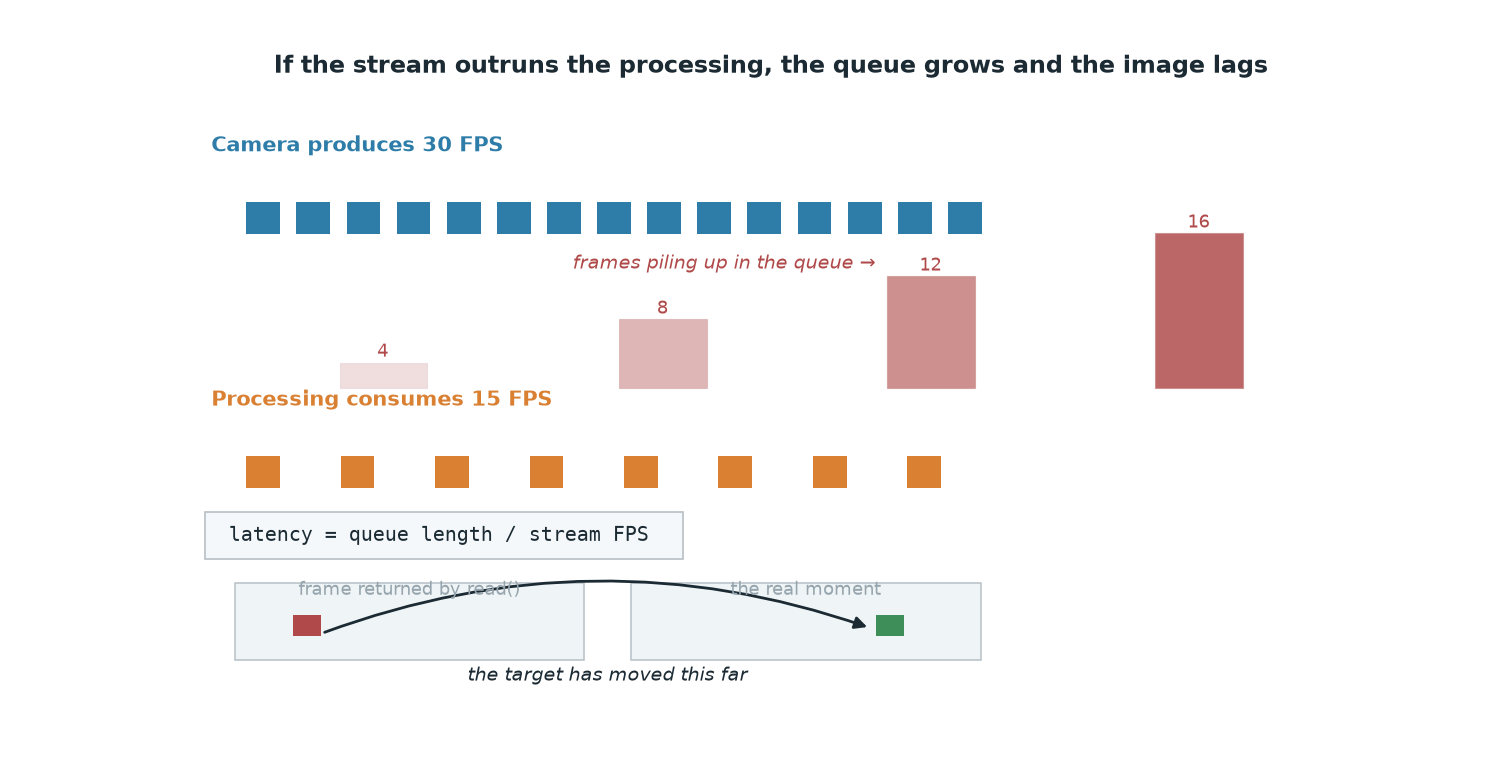
This is not a problem with the detection model, it is a problem in the video read layer. An RTSP stream produces frames at a fixed rate, while your loop can run slower because it is doing model inference. The difference has to accumulate somewhere, and that somewhere is a queue that exists whether you asked for it or not. As long as the queue never drains, cap.read() hands you the oldest frame in line, not the newest one.
This post covers the solution we run on our SUAS 2026 aircraft: how we read the 1080p RTSP stream from the SIYI A8 mini gimbal camera on a Jetson Orin NX without letting latency pile up, which settings actually do something, and which ones quietly do nothing at all.
What RTSP is, and why it shows up on drone cameras
RTSP (Real Time Streaming Protocol) does not carry the video data itself; it controls the session: it is a protocol for commands like "play", "pause" and "send me this stream". The actual video packets flow over RTP (Real-time Transport Protocol). The camera runs an RTSP server, and you connect to it with a URL.
The reason it is so common on drone cameras is practical: the gimbal camera connects to the companion computer over Ethernet and serves the same stream to both the ground control station and the detection code from a single address. The address the ArduPilot documentation gives for the SIYI A8 mini and ZR10 is rtsp://192.168.144.25:8554/main.264, with a default IP of 192.168.144.25.
Opening the stream with OpenCV
OpenCV's FFmpeg backend supports RTSP directly. Options destined for FFmpeg are passed through the OPENCV_FFMPEG_CAPTURE_OPTIONS environment variable. The format is unusual: a semicolon separates a key from its value, and a pipe separates one pair from the next.
The defaults for probesize and analyzeduration stretch out the stream open; lowering them shortens the time to first frame. Go too low and FFmpeg cannot work out the stream format, so step them down gradually and watch what isOpened() returns.
The real problem: the queue grows and the video falls behind
Simple arithmetic: if the stream produces 30 FPS (~33 ms per frame) and your loop processes 15 frames per second (~67 ms per frame), you fall 15 frames behind every second. After 10 seconds there are 150 frames in the queue, which is roughly 5 seconds of latency. In our flight configuration, YOLO11m runs at 15-20 FPS with full-frame inference at 640 pixels; as long as the stream rate is above that, the difference inevitably piles up.
The important part: this is not a fixed latency, it is a growing one. You can live with a constant 200 ms of lag; you cannot fly an autonomous drop with lag that grows every minute.
The fix: a reader thread that keeps only the newest frame
The right mental model is this: treat the stream not as a queue but as a single-slot box. A background thread reads continuously and overwrites the previous frame with every new one. Whenever the processing loop looks in the box, it finds the most recent frame; the frames it missed in between are dropped silently. In a detection system this is exactly the behavior we want: we would rather lose frames than lose freshness.
Using it, with frame age measured:
That age_ms line may be the most valuable thing in this post: you stop guessing at latency and start measuring it. If the number holds steady, you are fine; if it keeps climbing, there is still a queue somewhere.
Why CAP_PROP_BUFFERSIZE usually does nothing
The fix most often suggested online is cap.set(cv2.CAP_PROP_BUFFERSIZE, 1). In the OpenCV 4.x source, the FFmpeg backend's setProperty function never handles that property at all. Only CAP_PROP_POS_MSEC, CAP_PROP_POS_FRAMES, CAP_PROP_POS_AVI_RATIO, CAP_PROP_FORMAT and CAP_PROP_CONVERT_RGB are handled. So with the RTSP + FFmpeg combination the call quietly does nothing, and set() comes back False.
We left it in the class above anyway: the same code does take effect when it runs against a USB camera (V4L2) or the GStreamer backend. The rule is this: always check the return value of your set() calls. OpenCV does not raise on an unsupported property, it just returns False.
FFmpeg options and the TCP/UDP decision
Option | What it does | When to use it |
|---|---|---|
| Selects the transport layer: | When you deliberately want to override the default |
| Tries TCP first when it is available | OpenCV already does this by default |
| Reduces buffering during stream analysis | On every live stream |
| Upper bound on demux delay (microseconds) | When you do not want it stalling on a lost packet |
| Number of packets buffered for out-of-order reordering | When you want freshness on UDP and can accept the loss |
| Upper limit of the socket buffer, in bytes | When high-bitrate streams are dropping packets |
| Socket TCP I/O timeout (microseconds) | So a dead connection does not block forever |
For rtsp:// addresses, OpenCV applies either rtsp_flags=prefer_tcp (newer libavformat) or rtsp_transport=tcp (older ones) by default, depending on the libavformat version. In other words, if you do nothing at all, you are already on TCP.
TCP | UDP | |
|---|---|---|
Packet loss | Retransmitted, the frame stays intact | The loss stays, you get block artifacts |
Latency behavior | Latency spikes the moment a packet is lost | Latency stays flat through the loss |
Gateway/NAT | Usually no trouble | Can be blocked |
When | Wired Ethernet with little loss; also when you are recording | Radio or shared links, when freshness matters more than frame integrity |
Because the link between the gimbal and the companion computer on the aircraft is wired Ethernet, we stayed on TCP; when loss is already close to zero, whatever advantage UDP offers disappears.
Reconnection: unavoidable in flight
The camera reboots, a cable has a micro-dropout, the switch swallows a packet. The _loop above takes care of it: after 5 consecutive failed read() calls it releases the capture object and reopens it on the next pass. It matters that a single False return does not tear down the connection; transient frame errors are normal.
One warning: OpenCV's read() and open calls are blocking, and the default waits are long. CAP_PROP_OPEN_TIMEOUT_MSEC and CAP_PROP_READ_TIMEOUT_MSEC shorten them, but both are open-time only: they have to be passed in the parameter list, as in cv2.VideoCapture(url, cv2.CAP_FFMPEG, [cv2.CAP_PROP_OPEN_TIMEOUT_MSEC, 5000]), and cannot be changed afterwards with set(). Some opencv-python versions do not expose these constants, so check with hasattr(cv2, "CAP_PROP_OPEN_TIMEOUT_MSEC").
Common pitfalls
cap.set(CAP_PROP_BUFFERSIZE, 1): writing it and assuming the problem is solved. It is a no-op on the FFmpeg backend; print the return value.Setting the environment variable after the
cv2.VideoCapturecall. The variable is read while the stream is being opened; a later change does not affect that session.Mixing up the separators.
rtsp_transport;tcp|fflags;nobufferis correct; a comma or an=causes the option to be silently ignored.Putting codec-level flags into the demuxer dictionary. The contents of
OPENCV_FFMPEG_CAPTURE_OPTIONSgo to the stream open (avformat_open_input). Do not assume codec flags likeffplay -flags low_delaytravel that path; do not take the effect on faith without measuring it.Trying to "flush" the queue with a
grab()loop. Throwing away a fixed number of frames only matches the rate difference you have at that moment; when the rate changes, either the latency comes back or you burn CPU for nothing. The thread approach tunes itself.Never measuring frame age. Instead of eyeballing it and saying "looks laggy", add a one-line timestamp; that is the only way to see which change actually helped.
Staying on the software decoder on Jetson. On the Orin NX, a GStreamer pipeline that uses the hardware decoder (
rtspsrc latency=0 ! rtph264depay ! h264parse ! nvv4l2decoder ! nvvidconv ! video/x-raw,format=BGRx ! videoconvert ! video/x-raw,format=BGR ! appsink drop=true max-buffers=1) frees the CPU for the detection model; anddrop=true max-buffers=1on theappsinkmoves that same "newest frame" logic into the pipeline itself.
Practical summary
Do not read the stream in your main loop. Set up a thread that reads in the background and holds the newest frame in a single-slot box; dropping frames beats accumulating latency.
Store the capture time of every frame and print its age in milliseconds when processing starts. A steady number is good; a rising number means there is still a queue.
Pass FFmpeg options through
OPENCV_FFMPEG_CAPTURE_OPTIONS, before you create the capture object, inkey;value|key;valueform. Loweringprobesizeandanalyzedurationgets you to the first frame faster.Stay on TCP over wired Ethernet (OpenCV already prefers TCP by default). Only consider UDP on a radio or shared link, and only if you can give up frame integrity.
Write reconnection in from the start: release and reopen the capture after several consecutive failures, not on a single
read()error; shorten the open/read timeouts through the constructor parameter.